

What if the right business suite isn’t the one with the longest feature list, but the one that gives your daily work a clearer place to live? Choosing an online business suite Australia businesses can use comfortably starts with the tasks you need to manage, not the promise of an all-in-one system.
If customer activity, admin and everyday workflows are spread across separate tools, it’s easy to lose time switching between them. Enterprise software can also feel like more than a small operation needs. A useful suite should bring practical structure without adding needless complexity.
This guide explains how a business suite differs from a single-purpose tool, what to look for when comparing options, and how to choose tools that can adapt as your work changes. It also looks at how Sulit Suites supports business administration and workflows, while Sulit Market, Sulit Pocket and Mini-site Studio serve distinct needs, from commercial discovery to mobile access and branded online presentation. Start with what you actually do each day, then decide what belongs in your setup.
Key Takeaways
- See how a business suite differs from a single-purpose tool, an ERP system and outsourced services.
- Map your everyday business tasks before comparing options for an online business suite Australia businesses can use.
- Use practical criteria such as ease of use, mobile access, online presentation and commercial discovery to narrow your choices.
- Match the tool to the job: business administration, finding products and services, mobile access or presenting your work online.
- Explore how Sulit Suites, Sulit Market, Sulit Pocket and Mini-site Studio each support a different part of your digital work.
What is an online business suite, and who needs one in Australia?
An online business suite groups digital tools around everyday business tasks. It can give you a central place to support administration and workflows, while other tools help you present an offer, manage routine activity or stay organised. The mix of tools varies, so compare each function with the work you need to do rather than relying on the word “suite”.
A suite also differs from an outsourced service. Software supports work that you or your team do; an outsourced service supplies people to perform work for you. That distinction matters when comparing options. A digital workspace can help you organise tasks, but it isn’t a bookkeeper, marketer or administrator.
What does an online business suite do?
A suite brings together tools for related business jobs, rather than focusing on just one task. A single-purpose tool might help you prepare documents or schedule appointments. A wider suite may support several parts of running a business, such as managing workflows and maintaining a professional online presence. When comparing options, look at what each tool does, who will use it and how it fits into your regular work.
An online office suite commonly refers to web-based applications for tasks such as creating documents and collaborating. An online business suite may address a broader set of business needs. For example, Sulit Suites provides a central workspace for business administration and workflows. Other parts of Sulit’s digital platform have distinct roles, including commercial discovery, mobile access and branded mini-sites.
When might a small Australian business need one?
Look at the work that keeps recurring. If you’re copying details between tools, losing track of routine admin or switching between scattered online services to manage customer-facing tasks, a more organised setup may help. For instance, note where you keep task lists, customer information and materials for presenting your offer. The aim isn’t to collect more software. It’s to give regular tasks a clearer home.
Solo operators and sole traders can start small. You might need a way to keep workflows organised and present your offer online, without adopting a large system designed for a bigger operation. Choose only the functions that match your current work, then reconsider as your business changes.
For Australian businesses, the right scope depends on the work itself, not simply the size or label of the business. A suite can be a modest collection of useful tools or a broader workspace. Begin with repeated tasks and the friction they create. That gives you a practical basis for deciding whether one-purpose software is enough or a suite would bring things into better order.
Which business jobs can an online suite help you organise?
Start with the work, not a long feature list. A useful online business suite Australia businesses consider may support several different jobs, but those jobs don’t have to sit in one tool. Think about what you need to organise, how customers find you and where you need access during the day.
A workspace for everyday business administration
Routine administration can take up more time than it deserves. A central workspace can give business workflows a clearer home, helping you keep track of recurring tasks and the information you use to manage your operation. For example, you might use a workspace to organise the steps involved in preparing for a busy period or keeping regular business activity in order.
Before choosing tools, write down the tasks you repeat each week. Mark which ones are hard to track, involve switching between several places or tend to get put off. Then note what would make each task easier to manage, such as having a clear workflow or a consistent place to refer to. This list helps you decide what deserves a place in your setup. Sulit Suites provides a central workspace for business administration and workflows.
Tools for discovery, mobile access and online presence
Some jobs sit outside day-to-day administration. They relate to how customers discover your offer, how you stay connected on the move and how your business appears online. These needs differ depending on what you do and how customers prefer to find and engage with you.
- Commercial discovery: Sulit Market connects approved vendors and buyers for product and service discovery. It can be relevant if being discoverable through commercial listings matters to your business.
- Mobile access: Sulit Pocket is a mobile companion for marketplace updates and suite services. It supports mobile-first access as part of your digital setup.
- Online presentation: Mini-site Studio helps users create branded mini-sites without complex web development. It offers a way to present your business online without taking on a complex build.
These tools address distinct jobs. Choose based on your current priorities: a business focused on presenting its work may value an online home, while another may place more importance on administration or discovery. The Australian Government’s guide to digital tools to run your business can also help you think through the role software plays in your operation.
If a central workspace for workflows is the job you want to address, explore Sulit Suites.
Business suite, ERP or outsourced service: what is the difference?
These options can all help a business run more smoothly, but they do different jobs. A business suite gives you tools to organise work. Enterprise resource planning (ERP) software can bring broad operational functions into a larger system. Outsourcing means people perform agreed work on your behalf. None is automatically the right choice for every Australian business.
| Option | Purpose | Who does the work? | Scope | Likely user |
|---|---|---|---|---|
| Business suite | Support business tasks and workflows | You or your team, using software | Can be focused or cover several related jobs | An operator seeking useful tools without adopting everything |
| ERP | Plan and manage broad business operations | Your team, using a wider system | May span multiple operational areas | A business with complex or connected workflows |
| Outsourced service | Supply specialist work or ongoing support | An external service team | Centred on the agreed service | An owner who needs work performed, not just a tool |
How a business suite differs from enterprise ERP
A business suite can be a needs-led set of tools: choose what supports your current tasks, and leave out what doesn’t. ERP usually refers to a broader system for planning and managing operations across a business. The distinction isn’t simply small business versus large business. The number and complexity of your workflows matter more than a label. A solo operator may need a clear workspace, while a smaller business with involved processes may need broader systems.
How software differs from outsourced business services
Software gives you a place or tools to do the work; it doesn’t do the work for you. An outsourced service supplies people to carry out agreed tasks. For example, an outsourced finance service provides people to handle finance tasks, rather than software for managing them yourself. Consider whether you need a tool to manage work, a service to take work off your hands, or both for different tasks.
A suite doesn’t mean adopting every available tool. Sulit Suites provides a central workspace for business administration and workflows. The useful question is whether that kind of workspace fits the tasks you need to organise. If your workflows span several operational areas, assess whether a broader system is warranted. If the work itself needs to be done for you, software alone won’t replace a service. Match the approach to your workload, complexity and capacity, not to the longest feature list.
How to choose an online business suite for your Australian business
Choose from your actual work, not the size of a feature list. A needs-first approach helps you find an online business suite Australia businesses can use without taking on tools that don’t solve a current problem.
- Write down recurring tasks. Note the jobs you handle regularly and where effort or information feels scattered. Include admin, customer-facing work and the steps involved in presenting your offer.
- Identify users and access needs. Who will use each tool: just you, or other people in the business as well? If work takes you away from a desk, consider whether mobile access would be useful for those tasks.
- Separate essentials from extras. Mark what you need now, then set aside features that sound useful but aren’t tied to a real task. A sole operator may only need a focused starting setup.
- Check usability and purpose. Look for a clear explanation of what each tool is for. Consider whether its purpose and intended users match the way you work.
- Assess how you present and get discovered. Decide whether a branded mini-site would support your online presence, or whether commercial listing and discovery matter to your business goals. Treat these as separate needs, not automatic requirements.
- Review the setup as your work changes. Start with the functions that address today’s priorities. Revisit your choices as tasks, users or customer needs change, and adjust your digital setup accordingly.
This process keeps the decision grounded in day-to-day use. For example, a business that needs a more considered online presentation may prioritise a branded mini-site, while one focused on keeping workflows organised may start with a central workspace. Mobile access matters when it supports the way you work, not simply because it appears on a feature list.
Keep the first setup manageable. Sulit Suites provides a central workspace for business administration and workflows, while Mini-site Studio supports branded online presentation and Sulit Market supports commercial discovery. Each has a distinct purpose, so judge the fit against your task list rather than assuming every tool needs to be part of your routine.
To see how a central workspace can support your priorities, explore Sulit Suites.
How Sulit Suites brings practical digital tools together
After mapping your tasks and deciding what matters now, you can judge how Sulit Suites fits the way you work. It’s an option for an online business suite Australia small businesses may consider. Start with the job you want to make easier, then focus on the tool designed to support it.
Choose the Sulit tool that matches the job
The tools in Sulit’s digital platform have distinct roles. Consider which one addresses the business need you identified, whether that is organising work, supporting discovery, accessing services on the move or presenting your offer online.
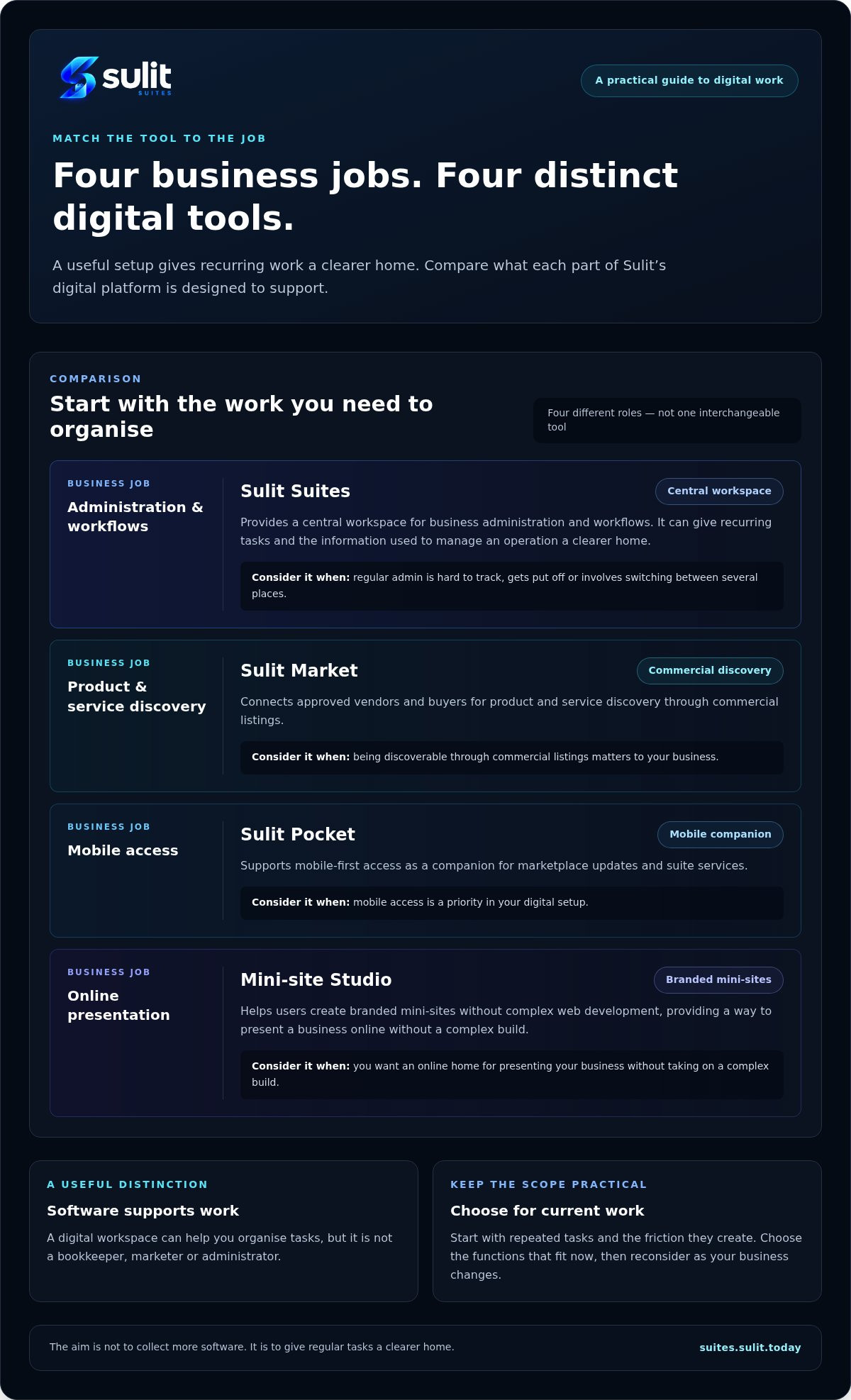
- Business administration and workflows: Sulit Suites provides a central workspace to support these tasks. It’s a practical starting point if you want a clearer place for routine business activity.
- Product and service discovery: Sulit Market connects approved vendors and buyers through a commercial marketplace. It supports product and service discovery when that is part of how you want customers to find an offer.
- Mobile access: Sulit Pocket is a mobile companion for marketplace updates and suite services. It supports mobile-first access to those activities.
- Online presentation: Mini-site Studio helps users create branded mini-sites without complex web development. It offers a way to present your business online without taking on a complex website build.
Each tool answers a different question: where will you organise workflows, how might buyers discover an offer, where do you need mobile access, and how will you present your business? Assess each role against your task list and decide which need to address first.
Begin with a manageable setup
Choose the task that creates the most friction today. If it’s business administration, start by considering a central workspace. If customers need a clearer way to discover your offer or understand what you do, consider the marketplace or mini-site role instead. Keep your first step tied to a real need.
Then pause before adding more. A tool is worth including when it supports a current task, not just because it’s available. As your work changes, revisit your setup and decide whether another role has become useful. That keeps your digital arrangements purposeful and leaves room to adapt without making the process feel like a large system overhaul.
To see how Sulit Suites can support your business workflows, explore Sulit Suites.
Choose a setup that works for you
The right online business suite Australia businesses choose should make everyday work clearer, not add tools for their own sake. Start with recurring tasks, then compare options by how well they support your workflows, customer-facing needs and preferred way of working. A business suite supports work, while an ERP may cover broader operations and an outsourced service has people perform agreed tasks.
Sulit Suites provides a central workspace for business administration and workflows. Sulit Market, Sulit Pocket and Mini-site Studio address distinct needs, from commercial discovery and mobile access to branded online presentation. Focus on the task that matters now and consider other tools as your needs change.
Explore Sulit Suites to see how its central workspace can support your business administration and workflows.
Frequently Asked Questions
What is an online business suite?
An online business suite is a group of digital tools arranged around business tasks. It may provide a central workspace for administration and workflows, while other tools support needs such as online presentation or commercial discovery. The scope varies, so compare the tools with the functions you need. Unlike an outsourced service, software gives you tools to do the work yourself; it doesn’t supply a team to perform it.
How do I choose an online business suite for a small business?
If you’re searching “online business suite Australia”, start by listing the tasks you repeat and where work feels scattered. Then identify who will use each tool, whether mobile access matters, and which needs are essential now. Check that each tool’s purpose is clear. Consider whether online presentation or commercial discovery supports your current goals, and begin with a manageable setup rather than adopting features you don’t need.
Is an online business suite the same as ERP software?
No. A business suite may offer a focused set of tools to support selected tasks and workflows. Enterprise resource planning (ERP) software is generally designed to manage broader operations across a business. The distinction depends on scope and workflow complexity, not business size alone. A small operation with complex processes may need broader systems, while another may prefer a simpler workspace that addresses a few practical needs.
Can a sole trader use an online business suite?
Yes. A sole trader can use a suite if it helps organise the work they already do. Start with one clear need, such as keeping routine workflows in order or presenting your business online. You don’t need to adopt every available tool. Sulit Suites provides a central workspace for business administration and workflows, while other tools in the wider platform address different tasks.
What is the difference between business software and an outsourced service?
Business software provides tools for you to manage and complete work. An outsourced service provides people to perform agreed work on your behalf. For example, software may help you keep a workflow organised, while an outsourced finance service supplies people to handle finance tasks. Decide whether you need a tool to support your own work, help completing the work, or a combination for different responsibilities.
Can an online business suite help my business look professional online?
It can, if the suite or its related tools support online presentation. For example, Mini-site Studio helps users create branded mini-sites without complex web development. A mini-site can give people a clear place to see your business identity and offer. Think about what customers need to understand when they find you, then choose a presentation tool that serves that purpose.
Can I manage business tools from my mobile?
Some business tools offer mobile access, but the options vary. Consider which tasks you need to handle away from your desk, such as checking updates or accessing a service while on the move. Sulit Pocket is a mobile companion for marketplace updates and suite services. Treat mobile access as a practical requirement if it fits the way you work, rather than assuming every tool has the same mobile functions.
