

What if the best freelance business management software is a setup with fewer tools, rather than more features? When client details sit in one app, project notes in another and business documents somewhere else, it’s easy to lose track of the work that keeps everything moving.
That scattered feeling is familiar to many independent workers. But a long feature list won’t necessarily make your day simpler, and software designed for a large team may add steps you don’t need. Start with the tasks you manage now, then look for tools that fit the way you work.
This guide will help you compare software against your real workflow, from presenting your business to organising day-to-day activity. You’ll learn which tool categories to consider, what to look for in each and how to avoid complexity you won’t use. You’ll also see how a central workspace such as Sulit Suites can sit alongside a branded mini-site or marketplace presence, supporting business organisation and an online presence.
Key Takeaways
- Match freelance business management software to the tasks you handle now, rather than choosing by feature count or broad labels.
- Separate core needs from useful extras by considering your workload, client expectations and how you present your services.
- Compare tools against real work, including business organisation, mobile access and how you showcase your offerings.
- Make adoption manageable: begin with one workflow, move only the information it needs, then review how well the setup works.
- See how Sulit Suites brings business administration and commercial workflows together, with Sulit Market connecting approved vendors and buyers.
What does freelance business management software actually manage?
Freelance business management software helps organise recurring tasks involved in running an independent business, such as managing business activity, presenting services and supporting client workflows. The functions depend on the product. One tool may focus on a single task, while another brings several parts of a workflow together.
Think of a freelance photographer preparing for a new project. They might use a business workspace to keep everyday activity organised, a mini-site to showcase their work and a marketplace to connect with potential buyers. Software can help manage these tasks, but the photographer still decides which projects to take on, what to offer and how to work with each client.
Which parts of freelance work can software help organise?
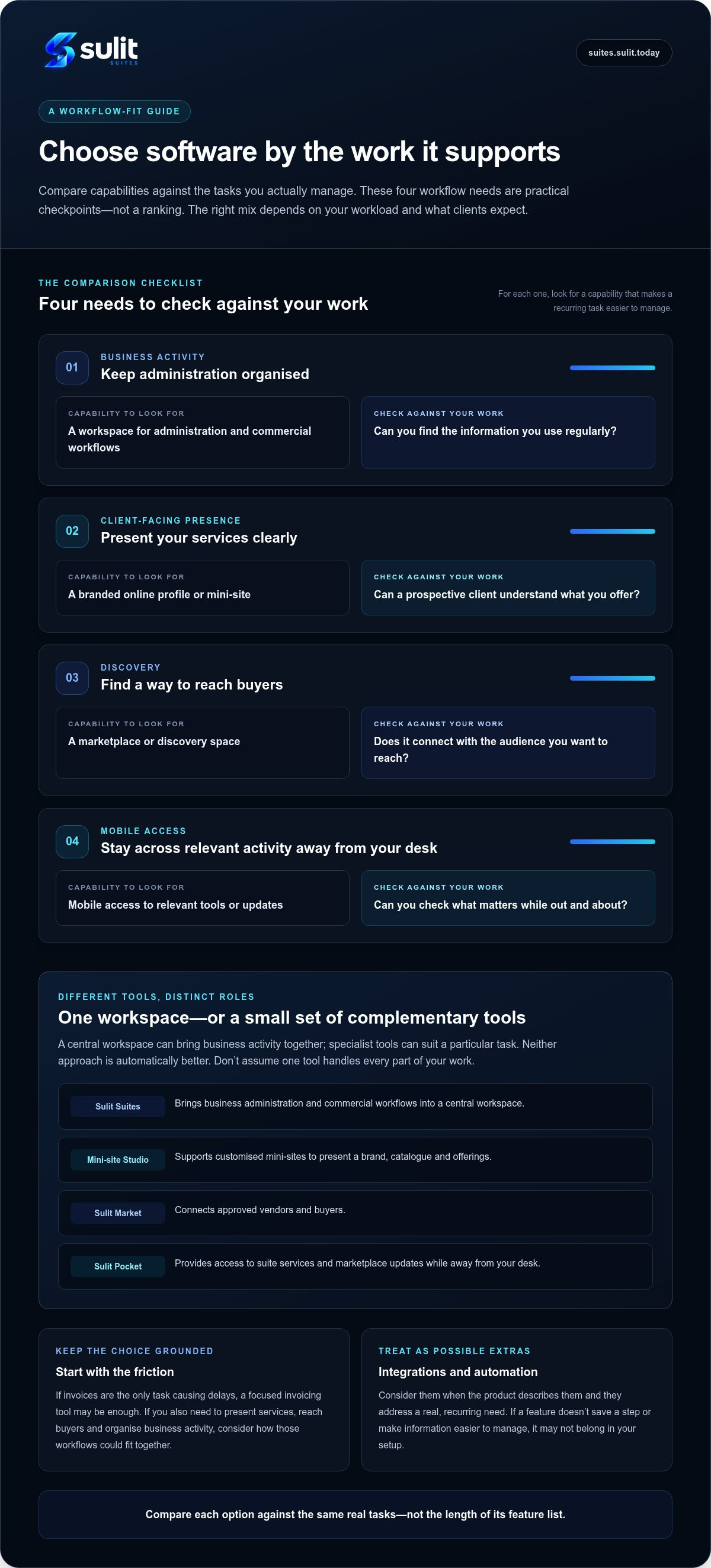
Start by looking at four areas: administration, client-facing presence, discovery and mobile access. You might need help keeping business activity in order, a polished place to present your services, a way to reach buyers or access to relevant tools while away from a desk. A single platform may cover some needs, or a small set of complementary tools may suit you better.
For example, a freelance designer could use a central workspace for business administration, a branded mini-site to display their offerings and mobile access to check suite services and marketplace updates. Sulit Suites brings business administration and commercial workflows into a central workspace. Mini-site Studio supports a customised presentation of a brand, catalogue and offerings, while Sulit Market connects approved vendors and buyers. Each has a distinct role, so don’t assume one tool handles every task.
Some tools focus on project coordination. An overview of project management software explains how these tools can support activities such as scheduling and sharing information. That’s one part of freelance work, not the whole business.
Is business management software the same as invoicing software?
No. Invoicing software centres on preparing and managing invoices or payments. A broader business workspace may support other kinds of business administration or commercial workflows as well. The label alone doesn’t guarantee a particular function, so look at what each product actually does.
Pinpoint the friction first. If invoices are the only task causing delays, a focused tool may be enough. If you’re also juggling how to present your services, reach buyers and organise business activity, consider how those workflows could fit together. That keeps your choice grounded in your work, rather than in a feature list.
Which software capabilities matter across a freelance workflow?
Choose capabilities according to the work they support. A designer may need an orderly workspace and a clear way to show their services. A consultant may care more about reaching buyers and accessing relevant business tools away from a desk. The right mix depends on your workload and what clients expect to see.
Digital platforms also help connect independent professionals with opportunities. Harvard Business School explores this role in its discussion of the on-demand workforce. For your own setup, focus on practical tasks you need to manage, not on having every capability under one roof.
How can software support client work and business administration?
List the tasks you repeat, then note where the information for each one lives. If you regularly switch between documents, profiles and accounts, look for ways to reduce repeated handling or make important details easier to find. A central workspace can bring business activity together; specialist tools can suit a particular task. Neither approach is automatically better. Choose what fits your workflow.
| Workflow need | Capability to look for | Check against your work |
|---|---|---|
| Organise business activity | A workspace for administration and commercial workflows | Can you find the information you use regularly? |
| Present services | A branded online profile or mini-site | Can a prospective client understand what you offer? |
| Reach buyers | A marketplace or discovery space | Does it connect with the audience you want to reach? |
| Work away from your desk | Mobile access to relevant tools or updates | Can you check what matters while out and about? |
Treat integrations and automation as possible extras, not assumed features. Consider them when the product describes them and they address a real, recurring need. A feature that doesn’t save a step or make information easier to manage may not belong in your setup.
Why do presentation and mobile access matter to solo operators?
Your online presentation gives prospective clients a straightforward way to understand your services and offerings. Mini-site Studio supports customised mini-sites for showcasing a brand, catalogue and offerings. For mobile use, Sulit Pocket provides access to suite services and marketplace updates, so you can check relevant activity while away from your desk.
To see how a central workspace could fit your business activity, explore Sulit Suites for business workflows. Start with the capabilities that match your day-to-day needs, then consider extras only when they solve a specific problem.
How should freelancers compare business management software?
Use the tasks you’ve identified as your comparison points. A feature list can look impressive, but the better question is whether the software helps with a real part of your working day. Compare each option against the same needs, such as organising business activity, presenting your services or checking updates while away from your desk.
What should a freelance software comparison include?
Compare these areas side by side. Note what each option does for your workflow and where you’d need another tool. The table is a guide, not a checklist every platform must satisfy.
| What to compare | Practical question | What to record |
|---|---|---|
| Workflow fit | Does it support a task you regularly handle? | The task it helps with, or any gap |
| Ease of use | Can you find and use what you need without adding extra steps? | Setup effort and everyday usability |
| Mobile access | Can you access relevant tools or updates when away from your desk? | What you can use on mobile |
| Presentation | Can it help you show your services or offerings clearly? | How it supports your online presence |
| Room to grow | Will it still suit your work if your needs change? | Relevant options for your likely next steps |
Consider how the software fits your existing habits. A setup that takes considerable effort to configure, or changes a familiar process without a clear benefit, may be hard to maintain. Base your judgement on the product’s descriptions and your experience using it. Don’t assume integrations, automation, security measures or performance levels unless the product documents them.
Is an all-in-one platform better than separate tools?
Not always. An all-in-one option may reduce switching if it brings together workflows you genuinely use. But a broad platform can feel excessive if most of its functions don’t match your work. With freelance business management software, choose the parts that solve current problems, not the promise of having everything in one place.
Separate specialist tools can be clearer when each has a distinct role and you can keep track of where information belongs. Compare the overall effort, including switching between tools and maintaining separate records. Review your setup as your workload changes. If a task becomes difficult to manage, reconsider that part of the system rather than replacing everything at once.
How can you choose and adopt freelance business management software?
A clear selection process keeps the decision tied to your actual work. Start with the frustrations you want to solve, then make one change at a time. You don’t need to move every task or piece of information into a new system straight away.
How do you turn business frustrations into selection criteria?
Write down the tasks that feel repetitive, scattered or difficult to explain to clients. Include where each task happens now, such as in a document, an account or a conversation. Mark each one as essential, useful or unnecessary for now. Turn the essential tasks into comparison points you can apply consistently to each option.
- 1. List friction points. Name the specific tasks that interrupt your work or make information hard to find.
- 2. Rank your needs. Separate must-haves from helpful extras, based on your workload and client expectations.
- 3. Compare the fit. Check how each option handles your essential tasks, how much setup it involves and whether it fits your working habits.
- 4. Start with one workflow. Choose a recurring task to organise first, rather than changing all your tools at once. Move only the information that workflow needs.
- 5. Review the result. After using the new routine regularly, assess whether it has made the task easier to manage and decide what, if anything, to adjust.
How can you make a software change feel manageable?
Keep your current process visible while you settle into the new one. That gives you a reference point if you need to find information or return to a familiar step. Choose a simple measure of improvement, such as fewer hand-offs between places or less time spent searching for a detail. The measure should reflect the original frustration, not a feature the software happens to offer.
Adoption should feel useful, not like another project to manage. Once the first workflow feels dependable, consider whether another task would benefit from the same setup. If your workload changes, review your choices again. The right arrangement now may not suit every stage of your business.
For a central workspace for business administration and commercial workflows, explore Sulit Suites as one option for your independent business setup.
How can Sulit Suites support an independent business setup?
A freelance business needs more than a place to keep administrative work in order. It also needs a clear way to present its offerings and help prospective buyers discover them. Sulit Suites provides a central workspace for business administration and commercial workflows, with separate tools for business presentation, marketplace connections and mobile access.
Think of these as distinct parts of a setup, each with its own purpose. Focus on the areas that match the way you work, rather than treating every tool as necessary for every freelancer.
Where do Sulit Market and Mini-site Studio fit?
A mini-site and a marketplace presence serve different needs. Mini-site Studio lets you create a customised mini-site to present your brand, catalogue and offerings. It gives people a place to understand what your business provides. Sulit Market, by contrast, provides a commercial environment where approved vendors and buyers can connect.
For example, an independent maker might use a mini-site to show their range and brand, while a marketplace presence offers another setting for connecting with buyers. Each supports a different part of the public-facing business. A marketplace connection doesn’t promise leads or sales, and a mini-site presents your offerings without guaranteeing client interest.
What role can Sulit Pocket play in everyday business use?
Working independently doesn’t always mean being at a desk. Sulit Pocket offers mobile access to suite services and marketplace updates. It can complement your routine when you want to check relevant business activity away from your main workspace.
Together, these tools let you consider business organisation, presentation and buyer connections as parts of one setup, without assuming they all perform the same job. That distinction matters when choosing freelance business management software. A central workspace can support administration, while a mini-site, marketplace and mobile access each address a separate need.
Explore Sulit Suites for independent businesses and consider which parts fit the way you want to organise and present your work.
Build a setup that fits the way you work
The right freelance business management software isn’t necessarily the one with the longest feature list. Choose tools around the tasks you handle, compare them against real needs and begin with one workflow. A small, well-used setup can be more helpful than a sprawling system you have to maintain.
Think about how you organise business activity and how clients discover what you offer. Sulit Suites provides a central workspace for business administration and commercial workflows. Mini-site Studio supports branded mini-sites for presenting your business, while Sulit Pocket gives you mobile access to suite services and marketplace updates.
Shape your setup gradually, keeping the parts that make your working day clearer. Explore Sulit Suites and find a calmer way to organise your business. Choose a starting point that suits your work, then build from there with confidence.
Frequently Asked Questions
What is freelance business management software?
Freelance business management software helps independent workers organise business tasks and workflows. Its scope depends on the product: one tool may focus on a specific task, while another offers a broader workspace or other business tools. Start by listing what you need to manage, such as business administration or presenting your services. Then compare each product with that list and check whether its functions support those needs clearly.
What software does a freelancer need to run a business?
There’s no single software setup that suits every freelancer. Begin with the tasks that take time or feel scattered, such as organising business activity, presenting your services or reaching buyers. Choose tools that fit those needs and avoid maintaining functions you won’t use. For example, a consultant may need a clear online presence, while another freelancer may prioritise a central workspace. Review your setup as your work changes.
Is all-in-one business software worth it for freelancers?
It can be useful if the included tools support several real workflows and are straightforward to manage. A broad platform may feel unnecessary if you only need one specialist function. Compare the software with your task list, not its feature count. Consider whether bringing related activities together would make your routine easier. A smaller setup with clear roles can be more manageable than a large platform you rarely use.
How do I choose freelance business management software?
Choose freelance business management software by starting with your recurring tasks. Rank them by importance, then turn the essential ones into comparison criteria. Check each option for workflow fit, ease of use, access and support for presenting your business. Once you’ve chosen a suitable option, start with one priority workflow and move across only the information it needs. After using it regularly, assess whether that task is easier to manage.
Can freelance business management software help me find clients?
Some platforms help freelancers present services or connect with potential buyers, but no software can guarantee enquiries or work. Check what the platform actually enables. Keep your service details clear and current so people can understand what you offer. A branded online presence and a marketplace can each support discovery in different ways, but they work best as parts of a broader approach to finding clients.
Should freelancers use one platform or separate business tools?
Either approach can work. One platform may make related tasks easier to access, while separate tools can suit distinct needs. Keep track of where important information lives and consider the effort of maintaining your setup. Compare each tool against your actual work, rather than choosing based on the number of features. If your routine becomes difficult to manage or your workload shifts, simplify or adjust the arrangement.
Can I manage freelance business tools from my mobile?
Some platforms provide mobile access to selected services or updates, but available functions differ. Consider which tasks you genuinely need to handle away from your desk, then assess whether mobile access supports them. Sulit Pocket provides mobile access to suite services and marketplace updates. It can complement your routine by making those services and updates accessible on the go, without replacing the rest of your business setup.